
Stray Trophy Roadmap
- Estimated trophy difficulty: 3.5/10
- Approximate amount of time to platinum: 6-8 hours (but doable in 2-3 hours in 1 playthrough if you’ve platinumed it before and are going for multiple platinum stacks)
- Offline Trophies: 25 (1
 , 7
, 7 , 9
, 9 , 8
, 8 )
) - Online Trophies: 0
- Number of missable trophies: 1 – I am Speed (must beat game in 2 hours, if you take longer the speedrun trophy will be missed). Everything else can be done via Chapter Select.
- Glitched trophies: 0, nothing glitched
- Does difficulty affect trophies?: No, there are no difficulty settings, it’s the same difficulty for everyone
- Minimum Playthroughs: 1, but 2 recommended for your first platinum attempt. If you are going for multiple stacks (PS4/PS5 plats or regional PS4 stacks) you can combine the speedrun with all collectibles in 1 single playthrough but it requires a perfect run and you must know the level layouts and collectible paths already. See the note below Roadmap Step 2 for tips if you want to go for multi-plat.
- PS4/PS5 Autopop & Save Transfer: No, there is no save transfer and no autopop
- PS4/PS5 Crossbuy: Yes
- Free-Roam / Level Select after Story?: Yes, there is Chapter Select, you can go back to replay any part of the game and still get any missing collectibles/trophies via Chapter Select
- Release Date: July 19, 2022
 , 7
, 7 )
)Introduction
Welcome to the Stray Trophy Guide! Stray is a platformer/puzzle Cat Game. It has 12 Chapters total and 67 Collectibles. You need 100% completion for Platinum. The first playthrough with all Collectibles should take between 4-6 hours and the Speedrun between 90 minutes – 2 hours. The Speedrun time limit of 2 hours is generous when doing only main objectives (it’s even possible to get all collectibles in a speedrun under 2 hours when knowing the levels perfectly). You have roughly a 30 minute time buffer for mistakes on the speedrun. Overall it’s a relatively simple and quick platinum that is achievable for everyone.
Step 1: Collectible Playthrough + Chapter-Specific Trophies [4-6 Hours]
Simply follow the Stray Collectible Guide. It’s a 100% walkthrough that includes all Collectibles and Trophies in chronological order. After this you only have the 2 hour Speedrun left.
With this guide you can expect the first playthrough to take 4-6 hours. There are 67 Collectibles and 12 Chapters total.
Step 2: Speedrun [2 Hours]
The trophy  I am Speed requires beating the game in 2 hours or less. From the Title Screen start a new game in an empty save slot. Finish the entire story in 2 Hours. You are allowed to back up your save game in PS+ Cloud or on USB (Console Settings > Saved Data and Game/App Settings > Saved Data > Console Storage). The 2 hour time limit is quite generous when going only for the main objectives and ignoring everything else. It can be done in around 1h30min so you have about 30 minutes buffer for smaller mistakes. Loading times (blackscreens) don’t count towards the time but dialogues do. During dialogues smash
  +
+  to skip through them quickly. Cutscenes can’t be skipped and add to your time. Deaths/Checkpoint Restarts also add to your time so avoid this. Pausing the game doesn’t add to the time. Make a manual backup save in the PS+ Cloud / USB every 1-2 chapters. If you get stuck anywhere for too long you can copy back the save. In the Title Screen you can scroll over your save slot to see your current time. Refer to the trophy description for the times you should have after each chapter.
You can follow the Stray Walkthrough and All Door Codes along the way to refresh your memory.
After the Speedrun you might still need the trophy  Productive Day for sleeping one hour. If that’s the case for you, it can be done in Chapter 4 by sleeping next to Morusque (the robot to whom you brought the Music Sheet Collectibles). Just keep the console running for one hour, no need to press any buttons for this.
If you are going for multiple Platinum Stacks:
There’s no save transfer or autopop, so if you want to platinum the PS4 + PS5 stacks (or the various regional PS4 stacks such as EU/US/Asia versions) you’ll have to redo all trophies. Luckily the game doesn’t take long and it’s possible to combine everything in 1 single speedrun playthrough under 2 hours. This is only feasible if you’ve platinumed it before and know the collectible routes perfectly. It’s not worth trying on your first platinum attempt. When you already know how to do everything it can be done in about 1h55min on a perfect run. There isn’t much room for error. It’s recommended to upload the save to PS+ Cloud/USB at the start of Chapter 10. That chapter has a lot of collectibles, if you end up taking a little over 2h (3-5 minutes slower) you can copy back the save and replay from Chapter 10 onward without Collectibles to save 3-5min on your final time, this might be enough to get you under 2h to save another full playthrough. Not being hit by any Zurks in Chapter 2 is a bit tricky, don’t waste time on checkpoint restarts if you get hit (it adds to your time). If you get hit just continue and come back after the speedrun via Chapter Select. Giving all Sheet Music to Morusque in Chapter 4 is also a major time eater, because he must finish playing one song before you can give him the next (the whole process wastes about 6 minutes). Pick up all Music but don’t give it to him. Then after finishing the game under 2h load up Chapter 6 (which takes place in same area as Chapter 4) and give him the Music through Chapter Select. This saves you about 6 minutes on your collectible speedrun. A tricky place is Chapter 11 where you must lock 2 Drones into a storage room. Remember that each Death/Checkpoint Restart adds to your time, so you don’t want to die repeatedly here. Quickly pause/quit the game before dying to avoid it counting. Only the trophy for sleeping 1 hour can’t be combined with the speedrun and must be done via Chapter Select but this doesn’t require active gameplay.
Useful Tips, Tricks and Guides:
- Stray Walkthrough
- Stray Collectible Guide
- Stray All Safe Codes & Door Combinations
- Stray Wiki & Strategy Guide
- Stray Chapter 4: Where to Find All Notebooks
- Stray Chapter 10: Where to Find Clementine
- Stray Chapter 10: How to Get Worker Jacket & Worker Helmet
Stray Trophy Guide
 |
All Done Unlock all trophies. |
 |
| Earn all other trophies in Stray to unlock Platinum. | ||
 |
A Little Chatty Meow 100 times. |
 |
| Press to meow 100 times. This can be done right at the start of the game and could be your first trophy, it only takes two minutes to do. You can also meow during cutscenes and animations. |
||
 |
Cat-a-Pult Jump 500 times. |
|
You jump by pressing  at ledges. You should get this trophy automatically within your 1st playthrough, you will need to jump a lot throughout the game. A quick way to farm it is in Chapter 1, you’ll come to a point where the game teaches you to chain-jump by holding down instead of tapping it, at that point you must do multiple jumps in a row. There’s no need to waste time farming it but if for some reason you don’t get it on your 1st playthrough you can jump back and forth at the chain-jump tutorial in Chapter 1 to do lots of jumps quickly. at ledges. You should get this trophy automatically within your 1st playthrough, you will need to jump a lot throughout the game. A quick way to farm it is in Chapter 1, you’ll come to a point where the game teaches you to chain-jump by holding down instead of tapping it, at that point you must do multiple jumps in a row. There’s no need to waste time farming it but if for some reason you don’t get it on your 1st playthrough you can jump back and forth at the chain-jump tutorial in Chapter 1 to do lots of jumps quickly. |
||
 |
Productive Day Sleep for more than one hour. |
|
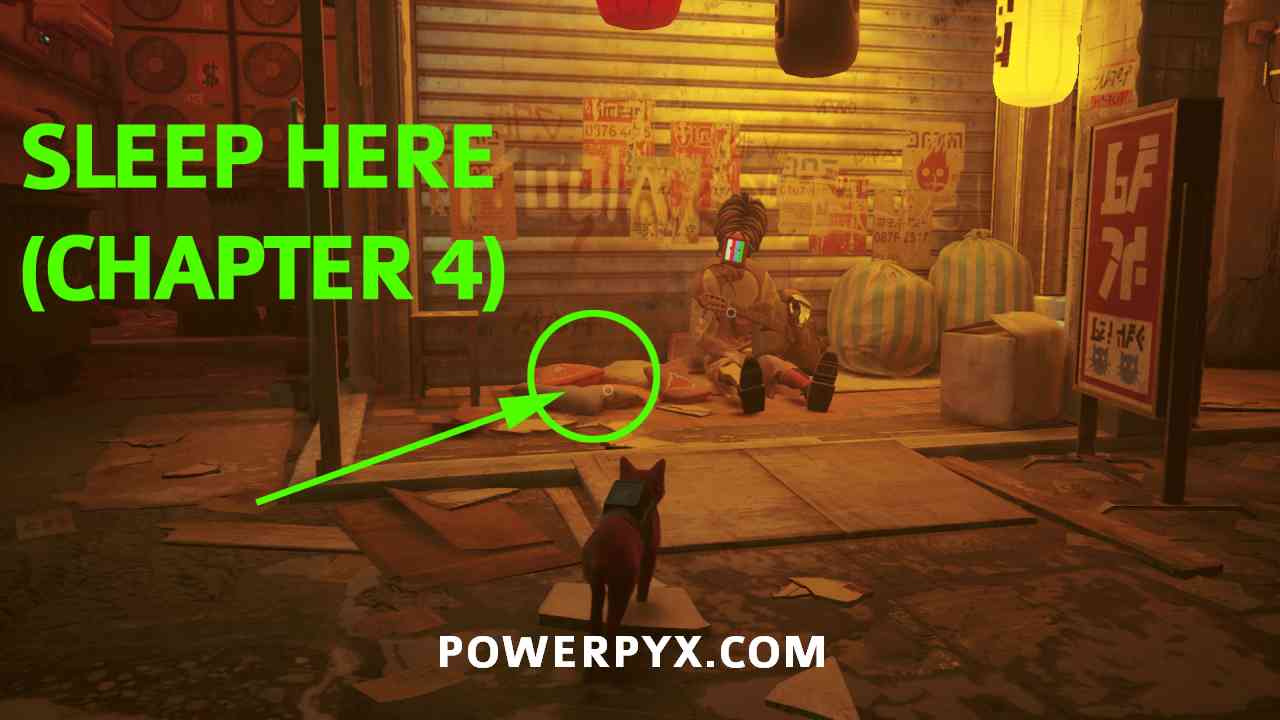
Throughout the game are various places where you can press  to sleep. A good place for this is Chapter 4: Slums. After meeting “Guardian” (robot with straw hat and staff, in front of garage), go to his left to find a robot with a guitar called “Morusque”. He’s the robot you need to bring the Sheet Music Collectibles to. On the left of Morusque is a little cat bed, interact with it to lay down. Go away for 1 hour and don’t press any buttons (feel free to set an alarm on your phone etc to come back in 1 hour). You don’t need to press any buttons, just keep the console running and make sure the controller doesn’t run out of battery or else it pauses the game. to sleep. A good place for this is Chapter 4: Slums. After meeting “Guardian” (robot with straw hat and staff, in front of garage), go to his left to find a robot with a guitar called “Morusque”. He’s the robot you need to bring the Sheet Music Collectibles to. On the left of Morusque is a little cat bed, interact with it to lay down. Go away for 1 hour and don’t press any buttons (feel free to set an alarm on your phone etc to come back in 1 hour). You don’t need to press any buttons, just keep the console running and make sure the controller doesn’t run out of battery or else it pauses the game.
Here’s the cat bed in Chapter 4, next to Morusque:
|
||
 |
Boom Chat Kalaka Dunk the basketball. |
 |

Chapter 4: The Slums After talking to the first humanoid robot, who is called “Guardian”, you can find a basketball to his right. Push it off the ledge to make it roll into a bucket below. If it doesn’t land in the bucket you can restart the checkpoint to retry. |
||
 |
Can’t Cat-ch Me Complete the first Zurk pursuit without being caught. |
 |
|
Chapter 2: Dead City The first Zurk pursuit takes place in Chapter 2. After finding a dying robot you will be chased by little bugs with yellow glowing eyes – those are the “Zurks”. You must finish the chase without any of the bugs ever latching on to you. If it shows the |
||
 |
Sneakitty Go through Midtown without being detected by the Sentinels. |
|
|
Chapter 10: Midtown In Chapter 10, after bringing the Worker Jacket & Worker Helmet to the robot called Blazer (mandatory story part, unmissable), you will be carried in a box to a factory. This is where the section for the trophy starts. There will be flying drones with blue searchlights on them. From now on you are not allowed to be spotted by any drone. If their searchlight turns yellow or red restart the checkpoint immediately. Checkpoint restart is allowed and doesn’t void the trophy so make use of it as often as needed. You’ll have to finish the factory, then return to Clementine’s Apartment (Sentinel Drones will spawn there too) and then leave the Apartment Complex, the trophy will unlock at that point, before entering the Nightclub. Every Drone has a predefined path it flies on. Some are stationary and change the direction of their searchlight at fixed intervals. Take it slow, look at their paths and quickly get past them while they look away from you.
|
||
 |
No More Lives Die 9 times. |
|
| The first opportunity to get this is in Chapter 2: Dead City, during the first Zurk Pursuit (bugs with yellow glowing eyes you must run from). Instead of running away from the bugs let them catch you. After they kill you press to retry and keep getting killed a total of 9 times here until the trophy unlocks. You can also farm it during any other combat encounter. You can only die during enemy encounters, not from falling damage or dropping down ledges. |
||
 |
Scratch Scratch the vinyl in the club. |
|
|
Chapter 10: Midtown At the end of Chapter 10 you will enter a nightclub. On one of the tables by the bar is a record, pick it up. Place it on the turntable at the main stage and press |
||
 |
Pacifist Complete the Sewers without killing any Zurks. |
|
|
Chapter 8: Sewers During the entire Chapter 8 you are not allowed to kill any Zurks (bugs with glowing eyes) using the It’s okay if they latch on to you and you shake them off with You are also allowed to restart checkpoints if you killed a Zurk by accident. If you don’t want to deal with this on the first playthrough you can easily do it via Chapter Select or during your Speedrun. After having played the Chapter once it will be easier because you already know where to go. |
||
 |
I am Speed Complete the game in less than 2 hours. |
|
|
For this you must beat the entire story (all 12 Chapters) in 2 hours or less. From the Title Screen start a new game in an empty save slot. You are allowed to back up your save game in PS+ Cloud or on USB (Console Settings > Saved Data and Game/App Settings > Saved Data > Console Storage). The 2 hour time limit is quite generous when going only for the main objectives and ignoring everything else. It can be done in around 1h30min so you have about 30 minutes buffer for smaller mistakes. Loading times (blackscreens) don’t count towards the time but dialogues do. Cutscenes can’t be skipped and add to your time. Tips:
My times at the start of each Chapter on first attempt (being 20-25min slower is fine):
|
||
 |
Missed Jump Fall inside the city. |
|
| Automatic story-related trophy, can’t be missed. Unlocks in Chapter 2, after leaving the sewers and entering the city outside. | ||
 |
Not Alone Meet B-12. |
|
| Automatic story-related trophy, can’t be missed. Unlocks in Chapter 3, after meeting the flying drone B-12 for the first time. | ||
 |
Cat Got Your Tongue? Have B-12 translate a robot. |
|
| Automatic story-related trophy, can’t be missed. Unlocks in Chapter 4, when talking to the first humanoid robot. | ||
 |
Catwalk Reach Midtown. |
|
| Automatic story-related trophy, can’t be missed. Unlocks in Chapter 10, when entering the market street with neon lights. | ||
 |
Al-Cat-Raz Go to jail. |
|
| Automatic story-related trophy, can’t be missed. Unlocks after Chapter 10 (start of Chapter 11). | ||
 |
Eye Opener Complete the game and open the city. |
|
| Automatic story-related trophy, can’t be missed. Unlocks after Chapter 12 when finishing the story. | ||
 |
Meowlody Bring all the music sheets to Morusque. |
|
| » Stray Collectible Guide | ||
 |
Curiosity Killed the Cat Wear the paper bag. |
|
|
Chapter 4: The Slums After talking to the first humanoid robot, who is called “Guardian”, head down the stairs to the left of him. There you find a paper bag on the floor, leaning against wooden boxes behind a red cat sign. Press |
||
 |
Cat-a-strophe Try to play mahjong with the robots. |
|
|
Chapter 9: Antvillage After the first cutscene in Chapter 9 when you reach the village, go up the ladder on the left and there will be 2 robots sitting at a table on the left, playing Mahjong. Simply jump on the table to pop the trophy. |
||
 |
Cat’s best friend Nuzzle up against 5 robots. |
|
| » Stray Collectible Guide | ||
 |
I Remember! Gather all B-12 memories. |
|
| » Stray Collectible Guide | ||
 |
Télé à chat Browse through all of the TV channels. |
|
|
Chapter 4: The Slums As part of the main storyline you will have to climb to the rooftops and talk to Momo (robot with straw hat and green flamingo shirt). On the rooftops below Momo’s apartment is a couch and TV. Jump on the couch and press |
||
 |
Badges Collect all badges. |
|
| » Stray Collectible Guide | ||
 |
Territory Scratch in every chapter. |
|
| » Stray Collectible Guide | ||
 purple Flashlight. Simply run past all of them, there’s no need to kill any of them.
PowerPyx says
Sweet game for a trophy hunt, enjoy!
KK says
For “Productive Day”, does sleeping has to be continuous or total?
Aeoniotita says
it requires a total amount of time. i tested this yesterday before sleep. i had accumulated a 5 minute long sleep when i started the game and when i finished my session in the night, i put the cat to sleep next to the musician bot. after 55 minutes the trophy popped
Sora says
Continuous
Kayla says
It does not need to be continuous. My cat was sleeping for 6 minutes when the trophy popped for me today (I did a bunch of sleeping yesterday)
FellOmen says
Honestly the only annoying trophy is Can’t Cat-ch Me. Because it seems random how the enemies just at you, so you can get hit even while dodging
GreyEagle says
Try going side to side when you come across bigger groups of them
Salvatore says
So if I pause, time won’t walk?
Finch says
Do you have to finish the chapter via chapter select for the collectible to count? Thanks for the guide amazing as always!
bersi says
I wonder the same for the scratching per chapter. Can I just load a chapter go scratch somewhere and then leave to the main menu and go for the next or do I have to finish the whole chapter for it to count?
Ale says
No. Just to the next checkpoint :d
Josh says
For the memories yes, for the badges no. You’ll notice a cat sign in the bottom left corner after you get a badge then if you go back to main menu you’ll have that badge when you enter another chapter
Nicolai says
No, it’s when it saves. You can look when every checkpoint is, when it has saved.
Melkor_S says
You don’t have to finish the chapter, but you do have to get the next checkpoint for the autosave before going back to the main menu
Kwiemmiej says
Yes, you have to complete the chapter! First i grapped the collectible that i missed and goes back to the menu. Then i saw thats my colletible was still missing. So i tryed with completing the chapter and then it saved. ( sorry my English is not that good)
Anonymous says
Thank you for the trophy guide. This game probably isn’t for me but that’s fine. It’s on PlayStation Plus Extra (but don’t know for how long) if you want to play it without buying it (and there’s a 7 day free trial available for PlayStation Plus Premium).
Rustyman75 says
PowerPyx, you guys are awesome! Thanks for having this ready to go on Day One!
Mohandgamer7 says
“Tele a chat” is bugged for me. I browsed through all the channels many times then restarted from checkpoint and restarted the game, tried browsing again and still nothing it won’t pop. Watched every channel for like 30 seconds just to make sure and nothing.
PowerPyx says
Try reinstalling the game. I’m not aware of this being a widespread issue, it could be an isolated incident – sometimes during the game install there’s a mistake with the trophy set installation that can break individual trophies that aren’t buggy for anyone else. Reinstalling the game fixes this.
If it bugs for anyone else here, please leave a comment!
kevin says
If you pause the game when doing the speedrun does that stop the timer or does it keep going ?
Quapmocka says
Also was looking for an answer for this. Hoping that it stops the timer while the game is paused.
White Corvid says
Pause stops clock.
Paws do not ?
Daflander says
I came here looking for the same answer but then I jut performed a test on the first chapter and it seems like it doesn’t. To be certain you may also do a test like that if you like. Just start your stopwatch when the game starts and pause the game for 2-3 minutes. Then play until you reach a checkpoint and quit. If the time in the “select a save” menu is different to your watch then it doesn’t.
Hope this helps
Ben says
Can I get No More Lives and Can’t Cat-ch Me both in one go at that chapter two area by dying nine times, then doing a perfect run on the 10? Hope that makes sense.
karim_lan says
Yes. You can reload the checkpoint for Can’t Cat-ch Me as long as you want till you get a perfect run.
Josh says
Yes that would work. Good luck getting can’t catch me in one try though lol
lino says
Can I get the “Can’t Cat-ch Me” trophy by reloading the chapter?
PowerPyx says
Yes. This is also answered in the guide. Quote: “If you don’t want to deal with this on the first playthrough you can still do it via Chapter Select after the story.”
unequalized says
Even restarting from checkpoint in Chapter 10 didn’t allow me to pop the Sneakitty trophy. Has this issue come up for anyone else?
dmikester says
I had a similar issue during my first collectible run; I thought I had done a perfect job of avoiding the Sentinels and I got to the security barrier and the trophy didn’t pop. I did it again in Chapter Select afterwards and went through that section again, needing to restart about four or five times (including having to restart the very last part where you need to jump down from Clementine’s apartment twice), and the trophy popped the moment I got past the barrier.
No idea if the trophy is glitched or, more likely, it’s easy to have a Sentinel turn yellow for a moment just as you move past it and the camera doesn’t show it to you but the game registers it.
It’s also I would say significantly harder to get the trophy when you’re combining it with an all collectibles run, as having to open that door on the left in order to give the worker his keys back re-exposes you to maybe the most aggressive Sentinel to get past in the whole run. I have a feeling that’s where I got messed up in my initial run.
Matthew Seymour says
Did any of the drone lights turn yellow? They have to stay blue the entire time or else you need to restart the checkpoint and go through the whole stealth mission again. Pretty tedious
Nicolai says
Yes, but when I did the chapter again and it popped. I think it is a bug.
Jen says
I noticed if you meow inside the apartment, the sentinel outside might turn yellow. I hadn’t noticed it the first time, when I thought it should have popped but I noticed it on my next run through when I went out the window that he was yellow.
dmikester says
I can confirm that you can pause the game as much as you want during the speed run and the time stops. I followed PowerPyx’s video, pausing frequently to keep up, and I finished in 1:37, which included dying three times. You can also frequently quit to the main menu and you can turn the game off and back on with no issue. A really generous speed-run that rewards precision over having to be glued to your screen for two hours straight.
gilbertoconcerto says
Can’t Cat-ch Me can be done alongside No More Lives. When attempting a purr-fect run (sorry) just let them take you down if they land on you. It took me 26 attempts to get a run done with no hits so it’ll happen naturally. Most frustrating trophy in the game because it’s so random if they hit you or not.
watchOCplays says
Powerpyx, Can you confirm on Pausing will affected the speed run time?
White Corvid says
Says in the guide it’s even possible to get all collectibles during the speed run. Do you mean All 67? I’d love to see a link. Unicorn run was it? Sounds like a myth. People I’ve seen making good time and bee-lining objectives (no collectibles) come in at 1hr 45.
Can’t reconcile the math.
PowerPyx says
It’s absolutely possible to do all collectibles in the 2h speedrun. See the tips in Roadmap. It can be done in 1h55min with all collectibles.
Carmen Leung says
If you are streaming the game from PS Plus, you will need to toggle the joystick every 7-10 minutes. The game will timeout from inactive play unfortunately. Set a timer, do some chores, and circle back every now and then.
Carmen Leung says
For the productive trophy ^
Heezy says
The “scratch” trophy won’t pop for me. Tried chapter select and tried another playthrough. Playing on PS5. I put the disc on the turntable, pressed triangle, pressed L2/R2 repeatedly and nothing happens.
puqwan says
Same here, did a full play through and it won’t pop.
Nicolai says
Do you make sure it saves before you quit the chapter? You can see it in the pause menu.
scott says
Pretty awesome game and as always amazing trophy guide. I got the platinum today and the speed run was just 20 seconds above yours and I had just one death.
Charlie says
Do B-12 memories save as soon as you collect them?
hawkwind666 says
It’s not possible to back up PS5 saves to a USB stick. That is only possible with PS4 saves. The only option with PS5 saves is to upload saves to cloud storage, which requires PS Plus. If you don’t have PS Plus, the speedrun trophy on PS5 will be significantly harder as you won’t be able to backup saves.
Scrubby says
The scratch trophy is glitched for me. I have tried it many times on first play through and chapter select. I am definitely doing it correctly as well.
Anyone had this problem and found a fix for it?
Hawk199 says
If you only have that trophy leave maybe you might wanna upload the save file to cloud or usb.
Then try delete the data and save file and do a quick run. Saver is to delete the whole game it’s data and reinstall
Encountered this sort of bug for other games and this work.
TheBob says
Does anyone know if you need 1 hour straight for the productive day trophy, or can it be 1 hour in total over several “sleeping sessions” 🙂
Charlie says
I just did one hour straight after getting all the other Trophies but others have said it can be done in segments. After doing a sleeping session though I guess you’d have to reach a save checkpoint for that session to register?
Hawk199 says
For “I am Speed” you can pause and it won’t add to the timer.
Playing on PS4*