
In Baldur’s Gate 3, after sleeping at camp, you may get a negative status effect called “Arcane Hunger”. There are multiple stages to this that get gradually worse, such as “Greater Arcane Hunger”. This gives you a disadvantage to Attack Rolls and Saving Throws. Simply put: it worsens the combat performance of the affected character.
Getting rid of this effect as quickly as possible is important or else you will have a hard time winning combat encounters.
Curing Arcane Hunger
To cure Arcane Hunger you must consume a magical piece of equipment.
- Open the Inventory (press “I” on PC)
- In the top right of the inventory click “Showing All” > filter by “Equipment”. Look for a piece of equipment that shows the following text in its description: “can absorb this item’s magic, destroying it“. These can be weapons, armor, or accessories like rings. They can come in the form of any rarity level so it might be a green or blue or pink item. A quick way to get such items is to visit a merchant and at the top of the trade menu click “Trade” > “Magical Items”. Below are pictures of examples:


- Right click the item and press “Consume”.

- A short cutscene will play that explains your Arcane Hunger was reduced.


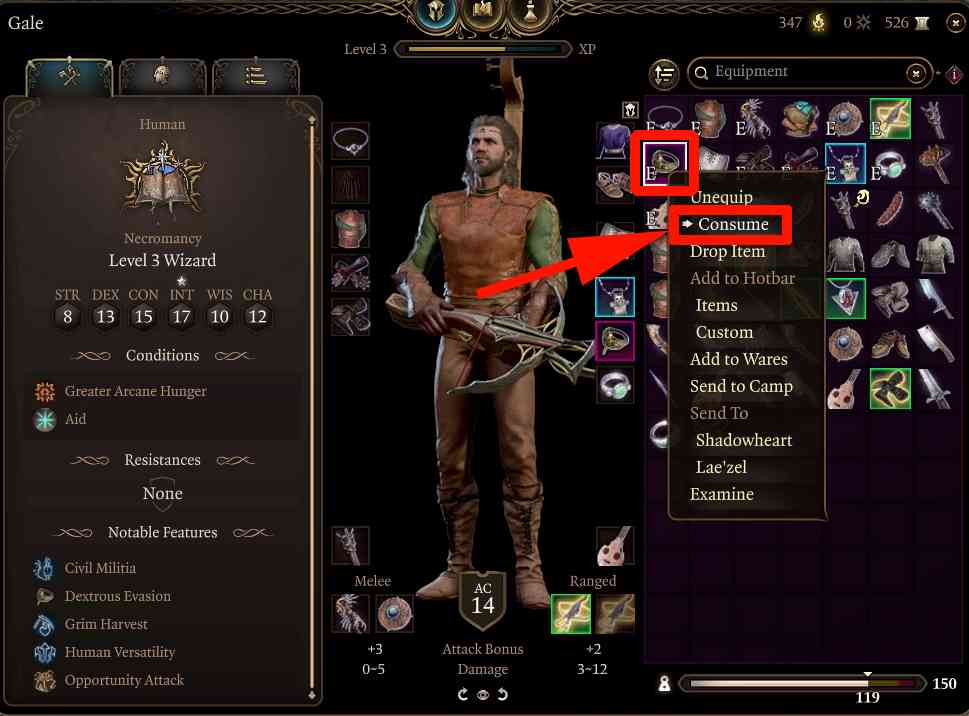
Each magical equipment piece you consume lowers the Arcane Hunger by one. So if you have “Greater Arcane Hunger” it will lower it to just “Arcane Hunger”. To fully cure this you must keep consuming magical items. Once the effect is removed your character will also stop being hunched over when standing still. When sleeping at camp for a full rest the effect will build up again but you can keep curing it by consuming magical equipment.
Tip: Also check the inventories of your other characters. Press “I” to open the Inventory > click the character faces on the left side to switch to their inventory > right click items and at the bottom of the dropdown menu choose the character name you want to send it to. This allows you to easily trade magical items to the affected character.
Barknmad says
I don’t see BG3 in your list of upcoming trophy guides sadly. Are your plans going to change? ???