PowerPyx.com

PowerPyx

  • Trophy Guides
  • Game Guides
  • Wikis
  • Trophy Lists
  • Next Guides
  • Contact
Show SearchHide Search
Home » Game Guides » Starfield » Starfield How to Establish Cargo Links

Starfield How to Establish Cargo Links

August 31, 2023 by PowerPyx Leave a Comment

In Starfield you can build Cargo Links to connect multiple Outposts. This allows them to automatically trade Resources for a more efficient production chain. Connecting 5 Outposts via Cargo Links unlocks the Shipping Magnate Achievement.

How to Connect Outposts with Cargo Links

  1. Build at least 2 Outposts. See How to Build Outposts.
  2. Fast travel to each Outpost, open the building Menu (use Scanner: on Xbox press LB > X / on PC press F > R.
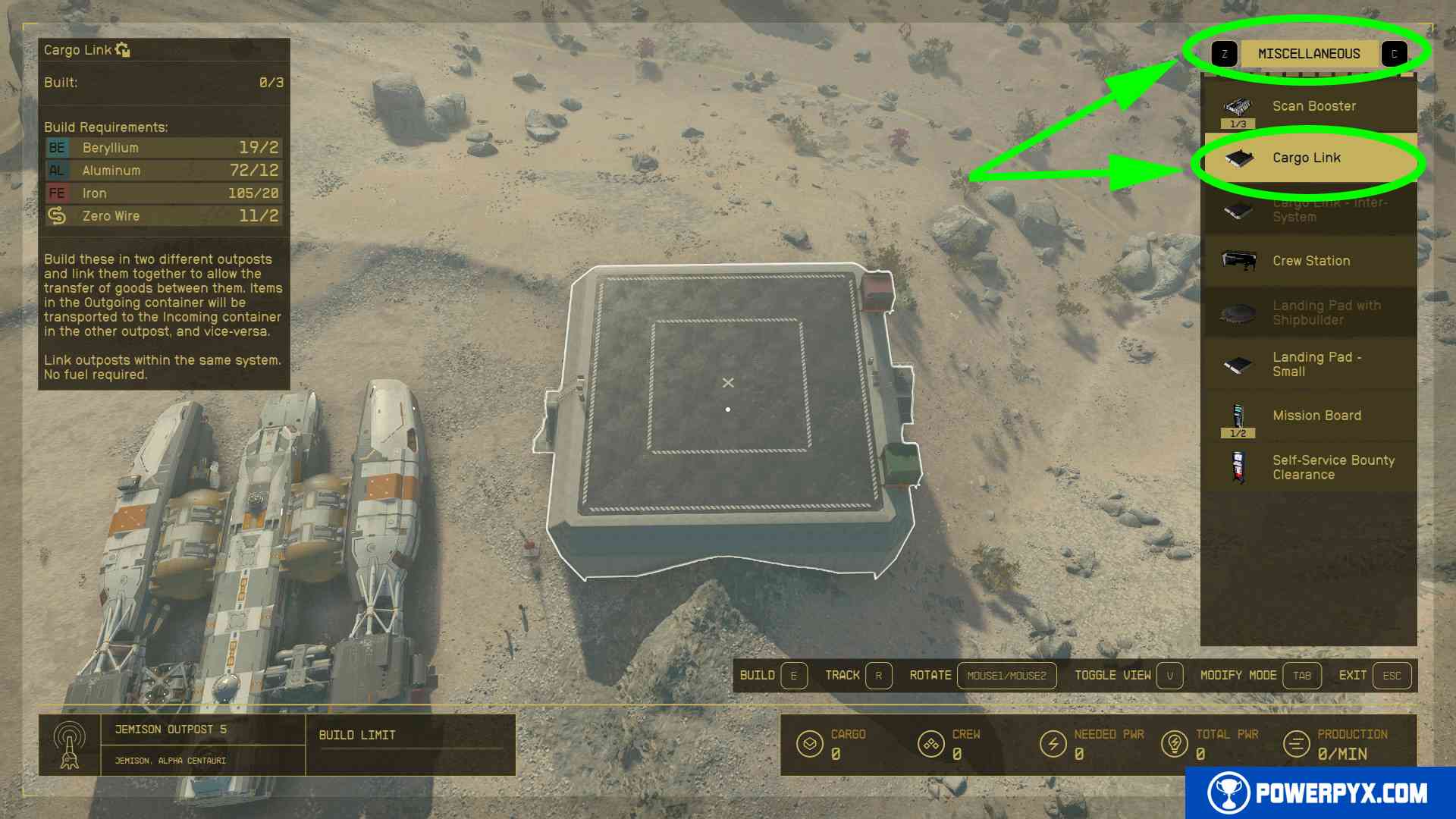
  3. Press Xbox: RB / PC: Z to switch to “Miscellaneous” category > pick “Cargo Link”. It costs 2 Beryllium + 12 Aluminium + 20 Iron + 2 Zero Wire. This is available from the beginning, it doesn’t require any skills or research projects. The materials can be bought form any merchant, for example the one at Jemison Mercantile (fly to Alpha Centaury > Jemison > New Atlantis landing pad > walk straight ahead to the train station and turn left to find this shop).
  4. Pick an empty spot and press Xbox: A / PC: E to build the Cargo Link. Do this in all Outposts, each must have one Cargo Link.
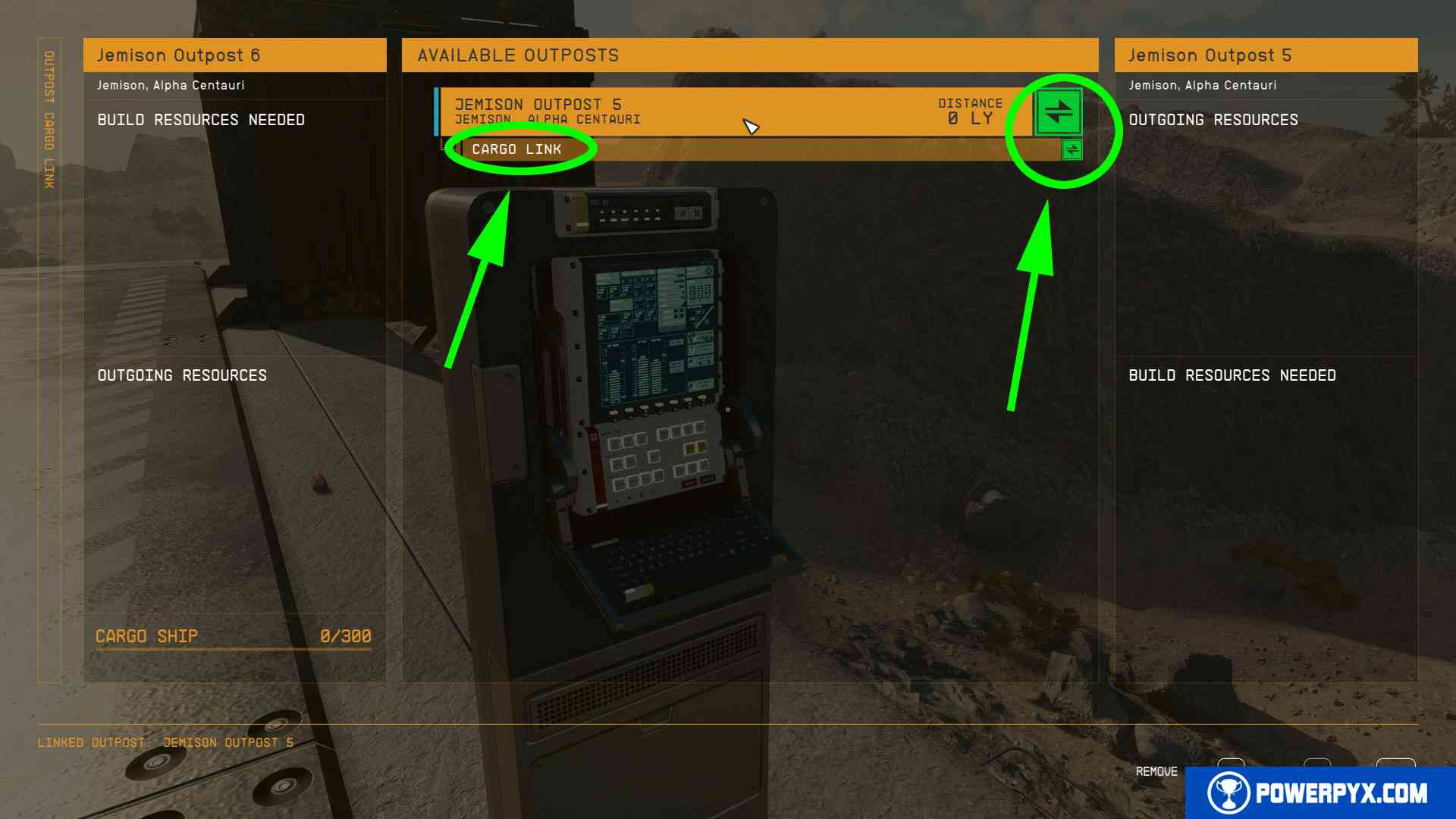
  5. Climb up the Cargo Link, there is a terminal on it. Interact with the terminal and click which Outpost to link it to. When done correctly it will show a green “link” icon.
     
  6. Link whichever Outposts it shows. Sometimes it can be a bit buggy and doesn’t show some Outposts. If this happens keep building more Outposts with Cargo Links and recheck which can be linked.
That’s all there is to linking your Outposts with the Cargo Link function. You can assign to the incoming/outgoing container which materials you want to trade and a spaceship will come to pick them up regularly.

Also see How to Remove Outposts.

For more Starfield guides check out Starfield Wiki & Strategy Guide.

« PrevStarfield How to Build OutpostNext »Starfield How to Switch Weapons & Use Weapon Wheel
Share
Tweet
Shares 0

Filed Under: Game Guides, Starfield

Leave a Reply Cancel reply

Your email address will not be published. Required fields are marked *

Youtube 1,210,000Subscriber
Facebook 15,000Fans
Twitter 19,200Followers

Latest Trophy Guides

Romeo is a Dead Man Trophy Guide

Nioh 3 Trophy Guide

Code Vein 2 Trophy Guide

Red Dead Redemption Remaster Trophy Guide

The Outer Worlds 2 Trophy Guide

Tormented Souls 2 Trophy Guide

Ninja Gaiden 4 Trophy Guide

Battlefield 6 Trophy Guide

Ghost of Yotei Trophy Guide

Silent Hill f Trophy Guide

Dying Light: The Beast Trophy Guide

Borderlands 4 Trophy Guide

Metal Gear Solid 3 Delta Trophy Guide

Mafia The Old Country Trophy Guide

Kingdom Come Deliverance 2 Trophy Guide

Red Dead Redemption 2 Trophy Guide

Latest Game Wikis

Nioh 3 Wiki

Ghost of Yotei Wiki

Borderlands 4 Wiki

Kingdom Come Deliverance 2 Wiki

Elden Ring Wiki

Hogwarts Legacy Wiki

God of War Ragnarok Wiki

Cyberpunk 2077 Wiki

Red Dead Redemption 2 Wiki

Recent Posts

  • Romeo is a Dead Man Trophy Guide & Roadmap
  • Romeo is a Dead Man Collectible Guide
  • Nioh 3 Trophy Guide & Roadmap
  • Nioh 3 All Collectibles Locations Guide
  • Nioh 3 Boss Guide (All Bosses)
  • Terms of Service
  • Privacy Policy
  • Cookie Policy
  • YouTube
  • Facebook
  • Twitter

© 2008-2025 PowerPyx.com, all rights reserved.